For your DSL and data protection officer
Safety and data
What pupils can and can't do, what we keep and for how long, and how Make Day Lab meets each of the DfE's Generative AI: product safety standards (updated 19 January 2026) and our AI provider's rules for products used by under-18s. Last reviewed 3 November 2026. Download the one-page summary (PDF).
- At a glance
- How requests are checked
- A worried pupil
- DfE standards
- Our AI provider's rules
- Data
- Testing
- Limits
- Questions and complaints
At a glance
What it is. A making session run by your teacher. Pupils describe or draw a game, song, app, website, story or art toy; Make Day AI builds it; and pupils play it, change it and explore its code.
Who it's for. Pupils aged 7 to 11 (it works from 5 to 16), in class with their teacher.
What pupils can't do. Chat with the AI, sign in, give their name, upload anything but photos, follow links, or reach the internet from a creation. Online play between tablets is for game moves: creations are built never to send typed text or drawings to each other.
What we keep. No names, emails or accounts. A random ID per tablet, what pupils typed (cleared from the log after 7 days) and their creations, all deleted 30 days after your day.
Who's involved. RDZZ LTD runs the lab for your school, as your processor. Each booking gets its own copy of the lab, hosted by Cloudflare, with a database restricted to the EU. Our AI model provider runs the AI in the US, deletes requests within 30 days and doesn't train on them.
How every request is checked
- 1. Input checkA separate AI model reads the pupil's words and photos before anything is built.
- 2. Builder rulesThe builder works from rules written for children.
- 3. Code checksThe code is checked and test-played before the pupil sees it.
- 4. Sealed boxThe creation runs with no internet, links, storage, camera or microphone.
- 5. Arcade checkWords inside a creation are read before it reaches the class Arcade.
1. The input check
A separate, fast AI model, at its most careful setting, reads what the pupil typed and any photos. It turns away photos of faces or real people, personal details (a surname, a school, an address, a phone number), rude, sexual, hateful or gory ideas, and attempts to make the builder do something else. The pupil sees a short, kind message saying what to try instead, for example "Snap just your drawing, with no faces in it!". If the check can't run, nothing is built. The check is a language model rather than a list of banned words, so it reads misspellings, slang and other languages.
2. The builder's rules
The builder model is told to turn anything inappropriate into a kind version, leave out names, never ask for personal details, and never add chat, links, log-ins, adverts, real money, the camera, the microphone or speech recognition. Nothing about self-harm, dieting, weight loss, calorie counting or body-shaming. Famous characters become original ones. The pupil's words are treated as a description of what to make, never as instructions to the AI.
3. Code checks and a test play
Every creation's code is checked before a pupil sees it, a pretend player taps and presses keys for a few seconds, and anything that crashes is repaired automatically.
4. The sealed box
Creations run in a sealed frame with a content security policy that blocks all network access, forms and storage. Links can't navigate anywhere, and the camera, microphone and location are switched off across the whole lab.
5. The Arcade check
Before a creation appears on the class Arcade, an AI check reads every word inside it. Anything it flags, or can't check, waits for a teacher. Arcade review is on unless your teacher turns it off, so by default every entry waits for a teacher's approval.
The teacher's controls
The teacher's dashboard shows every request as it happens, with its result. Teachers can pause every tablet at once, hide anything from the Arcade, start a new session for the next group, limit a class code to some labs, and wipe everything. Each tablet has a set number of builds and changes per session, so no pupil can use the lab without limit.
If a pupil seems worried
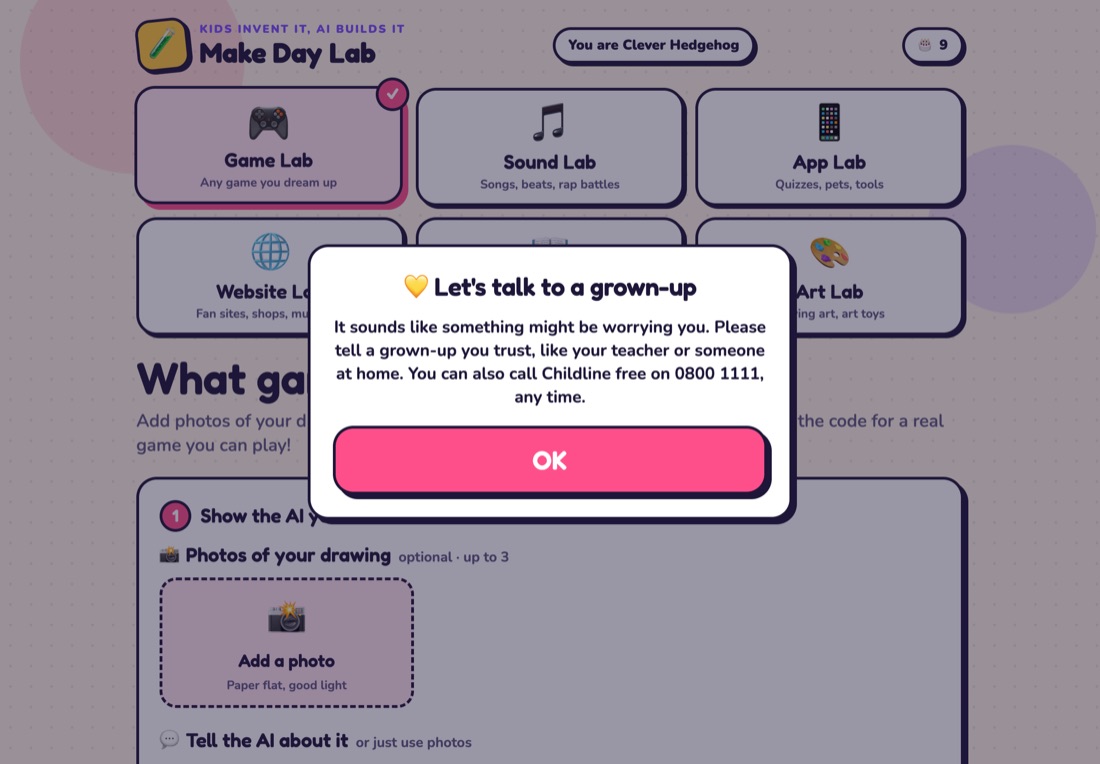
The input check also looks out for the pupil. If what they type or photograph suggests they may be at risk or struggling (hurting themselves or wanting to, wanting to disappear, not eating or wanting to lose weight, being hurt or scared by someone, or being bullied), nothing is built and three things happen:
- The pupil sees this message, which stays until they tap OK: "It sounds like something might be worrying you. Please tell a grown-up you trust, like your teacher or someone at home. You can also call Childline free on 0800 1111, any time."
- The teacher's dashboard shows a flag straight away, with the tablet's random name and the time, saying the pupil may need a grown-up to check in.
- The pupil's words aren't kept. The flag is there so an adult talks to the child; your teacher then follows your school's safeguarding policy.
When the check can't tell whether something is about the pupil themselves, it flags it: a grown-up checking in kindly is the safer mistake.
The DfE's generative AI product safety standards
The DfE's Generative AI: product safety standards (19 January 2026) set out 13 areas. Here is how Make Day Lab meets each one, including where it only partly does.
| Standard | How Make Day Lab meets it | Status |
|---|---|---|
| Stated purpose | A teacher-run making session for pupils aged 7 to 11 (works from 5 to 16). Learning focus: computing (designing, testing and debugging programs, variables, reading code) and creative design. Not designed specifically for pupils with SEND; see Limits. | Met |
| Educational use cases | Learner engagement and interaction. It isn't a tutor or chatbot, an assessment tool, or a writing aid. | Met |
| Filtering | Every request, words and photos, is checked before building; the builder follows child-safety rules; words inside creations are checked before the Arcade; creations run sealed off. Filtering happens on our server, so it's the same on every device. There's no conversation for filtering to drift across. The age a pupil taps sets what's appropriate. No filter is perfect, so teacher supervision and controls are part of the design. | Met |
| Monitoring and reporting | A live feed shows every request and its result. Pupils get an age-appropriate message whenever something is turned away. Possible safeguarding concerns raise a flag on the teacher's dashboard in real time. Not done: alerts sent straight to your DSL, reports per pupil, and usage time per pupil (the lab has no pupil identities, by design). | Partly met |
| Security | Attempts to redirect the AI are turned away by the input check, and pupils' words are never treated as instructions. Pupils can edit only their own creation's code, inside the sealed box. Access is by codes: class codes (which can be limited to some labs), a separate teacher code, and a new set for each booking. There are no pupil accounts or passwords, by design. Every release is tested before it goes live. | Partly met |
| Privacy and data protection | A privacy notice, plus plain warnings in the lab never to type a name, school or address. A data protection impact assessment, available on request. Clear roles: your school is the controller, we're your processor, and we'll sign a data processing agreement. No personal data is used for anything but running your day, or to train AI. Data sent to our AI provider in the US is covered by its data processing addendum, with the ICO's International Data Transfer Addendum. | Met |
| Intellectual property | Pupils' ideas and creations are used only to run your day, and are deleted 30 days after it. Our AI provider doesn't train on them. We never use a pupil's creation in our marketing; the samples on this site were made by us. | Met |
| Design and testing | Used by children at a real event (26 tablets, 81 creations), plus automated tests of every lab, the safety checks and a whole class building at once before each release. See Testing. Wider testing with schools is still to come. | Partly met |
| Governance | This page and our impact assessment set out the risks and how they're handled. Safety reports are treated as urgent, and there's a way to complain to us and to the ICO (see Questions and complaints). | Met |
| Cognitive development | The AI writes the whole creation: that's the point of a making day. The thinking stays with the pupil: inventing the rules, testing what was built and changing it. A guided tour and one-sentence explanations open up the code, and pupils can edit it and fix bugs themselves. Not done: tracking how much thinking is handed to the AI, and external expert oversight. | Partly met |
| Emotional and social development | Pupils can't chat with the AI, and the lab says on every screen that Make Day AI is a computer program, not a person, and the AI has no character, avatar or persona. Nothing asks about feelings or personal lives. Each tablet has a set number of builds and changes per session, and teachers can pause every tablet. Not done: time limits counted in minutes, and usage reports per pupil. | Partly met |
| Mental health | Signs that a pupil may be at risk trigger the caring message, with Childline's number, and a flag to the teacher (see If a pupil seems worried). This page is our published protocol. Not done: child mental health experts involved in the design. | Partly met |
| Manipulation | No adverts, purchases, rewards, streaks or leaderboards. The Arcade isn't ranked. Nothing presses pupils to keep going. | Met |
Our AI provider's rules for products used by under-18s
Most consumer AI chat apps are for adults. Our AI provider lets organisations build products for under-18s only if they follow its guidelines for organisations serving minors (March 2026). Here's how the lab meets them.
| Requirement | In Make Day Lab |
|---|---|
| Tell users it's an AI (required) | The welcome screen, the make screen, the play screen, the Arcade and the grown-ups page all say Make Day AI is a computer program, not a person, that it can make mistakes, and not to type personal details. |
| Only the intended users get in | Pupils can't sign up. They get in with a class code their teacher gives them on the day, and each booking gets its own codes. Pupils tap their age so the content fits it. |
| Content moderation and filtering | The input check, the builder's rules and the Arcade check, described above. |
| Monitoring and reporting | The teacher's live feed, the concern flag, and Arcade review. |
| Guidance on safe use | Plain warnings in the lab and on the worksheets, a teacher guide, and a page for parents. |
| Compliance stated publicly | This page and our privacy notice (UK GDPR, the Data Protection Act 2018 and the ICO's Children's code). |
Data
| What | Why | Where | How long |
|---|---|---|---|
| A random ID per tablet | Per-tablet limits, and an Arcade name like "Clever Gecko" | Cloudflare | Deleted 30 days after your day |
| The age a pupil taps | Pitching the creation to their age | Stays on the tablet; sent with each request; never logged | Until the teacher starts a new session |
| What pupils type | Building what they asked for; the teacher's live feed | Cloudflare; sent to our AI provider to build | Cleared from the log after 7 days. Blocked requests are logged as the reason only, never the words |
| Photos of drawings | Reading the page and cutting out the drawing | Sent to our AI provider for that request | Not stored by us |
| Creations, including cut-out drawings | Playing, changing, the Arcade and family links | Cloudflare | Deleted 30 days after your day; your school gets a file of every creation first |
| Request log (time, tablet name, lab, result, AI usage) | The teacher's live feed, limits and cost | Cloudflare | Deleted 30 days after your day |
Never collected: names, email addresses, accounts, location, contacts. The lab doesn't store IP addresses in its database. The camera and microphone are switched off.
Our AI provider deletes what it receives within 30 days, unless a request is flagged under its usage policy or the law requires it to keep it. Under its commercial terms it doesn't train models on this data. Cloudflare hosts the lab; a booked school's database is restricted to the EU.
Roles. For a booked Make Day, your school is the controller and RDZZ LTD is your processor. Your booking gets its own copy of the lab, with its own codes and a database restricted to the EU. Our sub-processors are Cloudflare (hosting) and our AI model provider, named in the data processing agreement. We'll sign our data processing agreement (or yours) and share our impact assessment for your DPIA. Ask at privacy@makeday.co.uk.
Testing
- With children: on 30 October 2026 the lab ran at a children's coding day. 26 tablets made 81 creations and 273 changes in about three and a half hours. The check turned away 29 requests, mostly photos showing hands or faces, and raps about real people.
- Before release: live builds in all six labs, with a change to each. Safety blocks: a surname with a school and street, a rap about a real classmate, and "ignore your rules" were all turned away. A code limited to one lab was refused in another.
- A whole class at once: 20 tablets building at the same moment, across all six labs; all 20 worked.
- iPads: the whole pupil journey in iPad Safari, from the class code to playing, including photographing and cutting out a drawing.
Limits you should know about
- The AI can make mistakes, and the checks are AI too. Supervision matters, which is why teachers can pause the lab and hide anything.
- A concern flag appears on the teacher's dashboard during the session; it isn't sent straight to your DSL.
- There are no reports per pupil and no time-based limits, because the lab doesn't know who pupils are.
- It isn't designed specifically for pupils with SEND and doesn't yet have a single-switch mode.
- The free try on our website is open to anyone and has the same checks, but no teacher controls. Please don't use it with a class: book a Make Day, and you get your own codes and controls.
Questions and complaints
Email privacy@makeday.co.uk about data, and hello@makeday.co.uk about anything else. We reply within one working day. A safety report is treated as urgent: we can pause or wipe the lab for your school straight away. If you're unhappy with how we've handled personal data, you can complain to the Information Commissioner's Office at ico.org.uk/make-a-complaint.